What is a Call Segment?
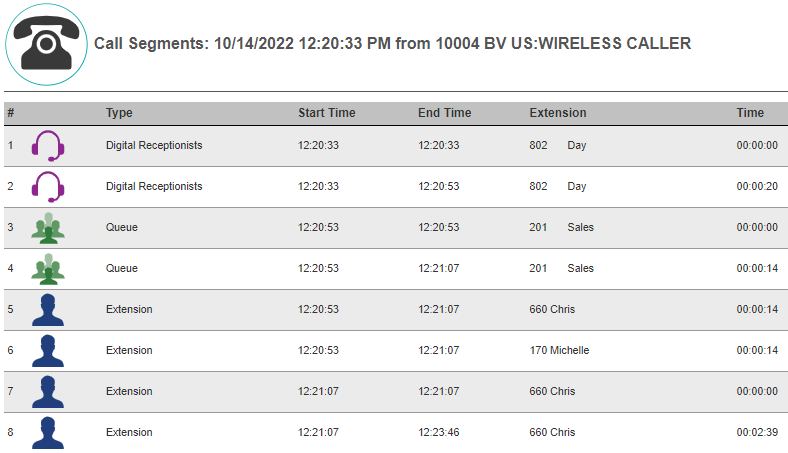
Call Segments a breakdown of a call's path inside the phone system. By following a Call Segment, you will be able to see what queues and agent extensions a call passed through along with time stamps.
How to Access Call Segments
- Log into the 1stream Portal.
- Set the desired Date Range, and choose a Team/Extension if desired, then click the Magnifying Glass icon to search.

- Select the desired Call Filter.
- Find the call in question and click the Call Segment icon (three blue lines). If you cannot see this, you do not have 1Stream Enterprise licensing.

- A pop-up will appear that will display the segment data from the selected call.
API Access to Call Segments
Our 1Stream API has a GetCallSegmentLogs endpoint which allows you to query for the call segments for a date range or specific calls, and action that data as you see fit.
You can find more info on this in our feature release post and API KB article below:
- New API Endpoint: GetCallSegmentLogs
- 1Stream API