Implementing CrewHu
- Log into the 1stream Admin Portal.
- Go to the Administration > Manage Organization menu in the top right.

- Scroll down to the Client API Keys section.

- Click on the green circled + plus button. The Add New Client Access API Key window will appear.
- In the Reference Name field, input CrewHu.
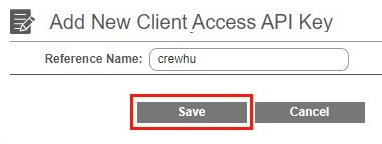
- Click the Save button. The API key will be listed.
- Copy the API Key created in 1stream.
- Log into CrewHu.
- Go to the Setup menu.
- Select the Integrations option.
- Scroll down to the 1Stream section.
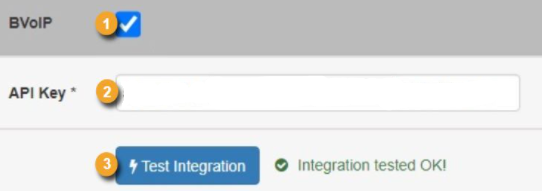
- Check the checkbox next to 1Stream to enable the integration.
- In the API Key field, paste the API Key from 1stream.
- Click the Test Integration button.
Once the integration is complete, a contest will need to be made. For assistance on how to create a contest, please refer to the Creating a CrewHu Contest article.