Available Reports
1stream has more robust reporting available compared to what is listed in the 1Stream phone system. See our article listing these and screenshots below.
More reports than this are available in the portal, and new reports are added regularly and upon request.
Want Additional Reporting?
For additional reporting, we offer the following options:
If you are not seeing the desired sort of reports, please reach out to our support team with your request or submit an idea request.
Pulling a Report
- Log into the 1Stream portal.

- Click on the Reports icon. A drop-down menu will appear with the available reports.
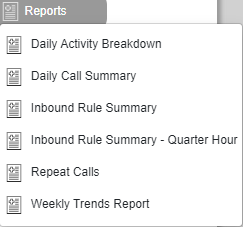
- Select the desired report. A pop-up will appear with the report's name and visual data, if available.
- Adjust the Date Range as desired.
- If the date was adjusted, click on the arrow button to search the new dates.

- If the date was adjusted, click on the arrow button to search the new dates.
- Click the Excel icon to download the available report in a .CSV file.

The file will then download to the computer.